A hospital management information system (HMIS) is integrated software that manages a hospital’s clinical, operational and administrative work in one platform. That includes patient registration, triage, consultations, prescriptions, diagnostics, admissions, bed management, inventory and staff administration.
A traditional hospital management system often handles billing or records on their own. A modern hospital management information system connects every department to the same patient record, so information moves with the patient instead of on paper.
The World Health Organization sees digital health systems as a key enabler of stronger, more accountable health services. For public hospital networks, a well-designed HMIS is essential.
The Challenge: Disconnected Departments and Paper-Based Workflows
Before IHMIS, the client’s facilities faced challenges common to large public hospitals.
- Fragmented records. Registration, triage, consultation and lab data sat in separate registers, so clinicians could not see a patient’s full history in one place.
- No queue visibility. Staff had no real-time view of waiting times, paused patients or missed services.
- Manual bed tracking. Ward capacity, overflow and occupancy were tracked on paper, which slowed admissions.
- Weak specimen traceability. Laboratory samples had no digital tracking from collection to result release.
- Scattered stock and HR tools. Medicine batches, trolley stock, staff records, leave and payroll were managed separately.
The client needed a hospital management information system that could scale across 28+ units and multiple facilities without disrupting how care is delivered.
Our Solution: A 16-Module Hospital Management Information System
Divergent designed IHMIS around the real patient journey. Each module is a role-based workspace, and every module shares the same patient record.
1. Main Dashboard and Role-Based Access
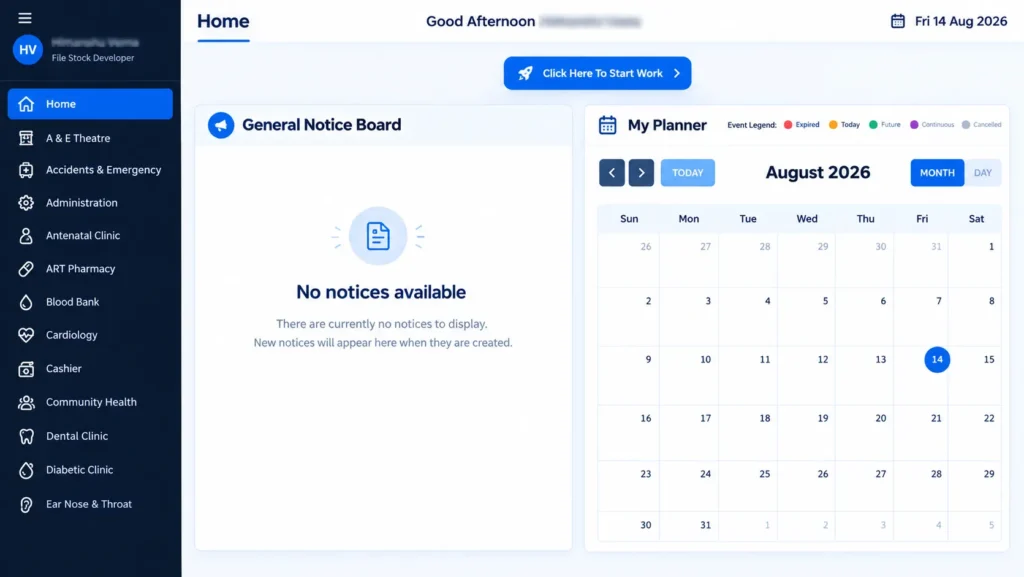
After login, each user lands on a central dashboard. It shows the departments they can access, a hospital notice board and a personal planner.
Role-based access means a triage nurse, radiologist or HR officer sees only the workflows their role needs. This keeps the hospital management information system simple and secure.
2. Patient Registration and Search
New patients are registered through a guided six-step workflow:
Patient Classification → Bio Data → Next of Kin → Biometrics (optional) → Security Information → Summary
The registration workflow handles:
- Adult and child patients
- National status: national, foreigner, refugee or cross-border
Existing patients can be found by name, phone number, email, patient number or ID. Their full profile opens with one click.
3. Front Desk and Visit Management
Front-desk staff start a patient visit in seconds. They set the patient type and the visit priority (Urgent, Emergency, VIP or Routine). Then they route the patient to the right facility unit and service, such as General OPD → Triage.
4. Triage Management
The Triage Work Queue gives nursing staff a live view of the queue:
- Patients waiting
- Patients in service
- Patients already serviced
- Average waiting time
- Paused or missed patients
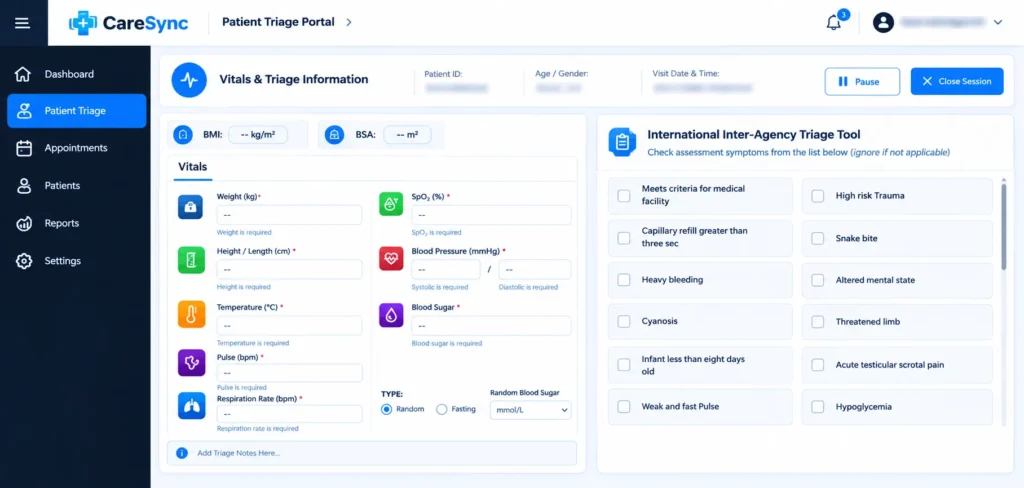
During assessment, nurses record weight, height, temperature, pulse, respiration rate, SpO₂, blood pressure and blood sugar. BMI and BSA are calculated automatically.
A built-in inter-agency triage checklist flags emergency signs such as heavy bleeding, altered mental state and hypoglycaemia, so critical patients are prioritized quickly.
5. Clinical Consultation
Clinicians receive patients forwarded from triage. From one consultation workspace, they can:
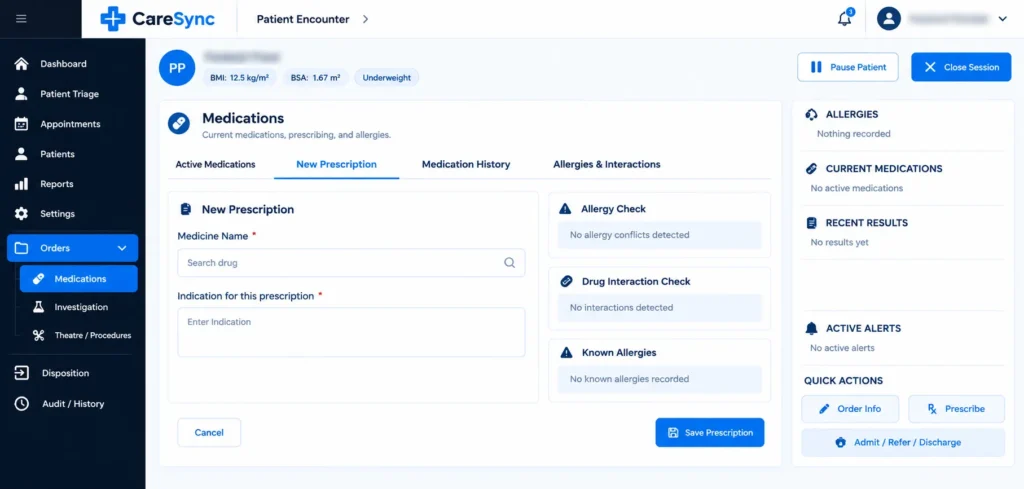
- Prescribe medication, with built-in allergy and drug-interaction checks
- Order investigations from Laboratory, Radiology or Cardiology, at STAT, Routine or Emergency priority
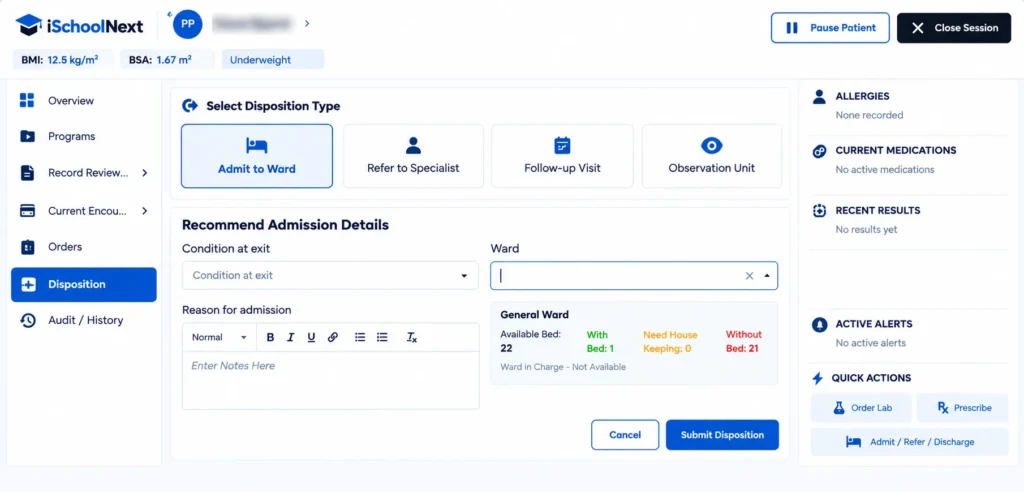
- Record a disposition: Admit to Ward, Refer to Specialist, Follow-up Visit or Observation Unit
When a patient needs admission, the clinician sees live bed availability before submitting the decision. This connected flow is what sets a true hospital management information system apart from standalone EMR tools.
6. Appointment Management
The appointment dashboard shows how many appointments are Due Today, Attended, Late, Cancelled and Rescheduled.
Staff verify the patient’s identity first. They then book the appointment by facility unit, service, date and time. Every appointment is tracked in a filterable registry with print and download options.
7. General Ward and Inpatient Management
The inpatient side of the hospital management information system brings ward care into one place.
- Ward Patient Attention: highlights unattended and critical patients, with time-since-update indicators.
- Admission Processing: verifies admission details and allocates a bed or space.
- Nursing Care Management: tracks due, due-soon and overdue tasks such as blood transfusion, vital-sign monitoring, pain management and wound care.
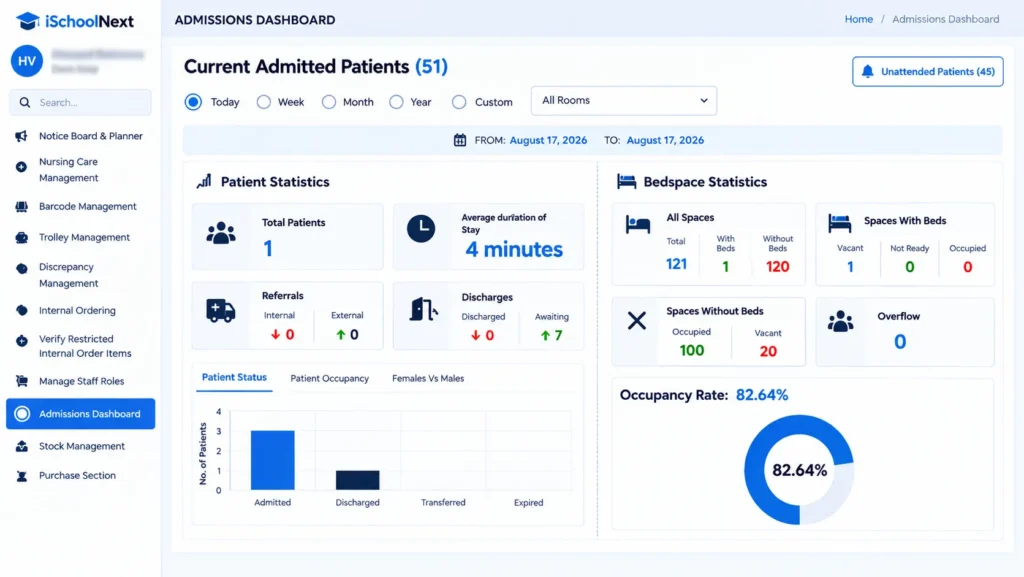
- Admissions Dashboard: shows total patients, average length of stay, referrals, discharges and occupancy rate.
- Doctor’s Ward Management and Ward Rounds: helps physicians review admitted patients, lab results and pending discharges.
8. Bed and Placement Management
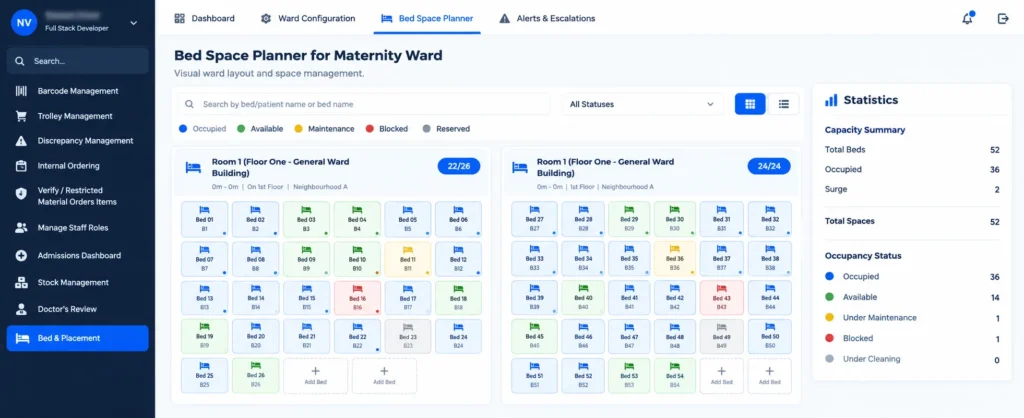
This module gives administrators full control of ward capacity.
- Ward Occupancy Dashboard: real-time patient placement across standard beds, floor spaces and corridor spaces, with alerts.
- Room Capacity Configuration: calculates operational capacity from room dimensions and bed type.
- Bed Space Labeling: generates bed identifiers automatically, or lets staff set custom labels.
- Interactive Bed Space Planner: a colour-coded map showing occupied, available, cleaning, maintenance, blocked and reserved beds.
- Overflow Policies: rules for floor and corridor overflow, supervisor approval, and keeping critical, infection-risk or isolation patients out of unsafe overflow spaces.
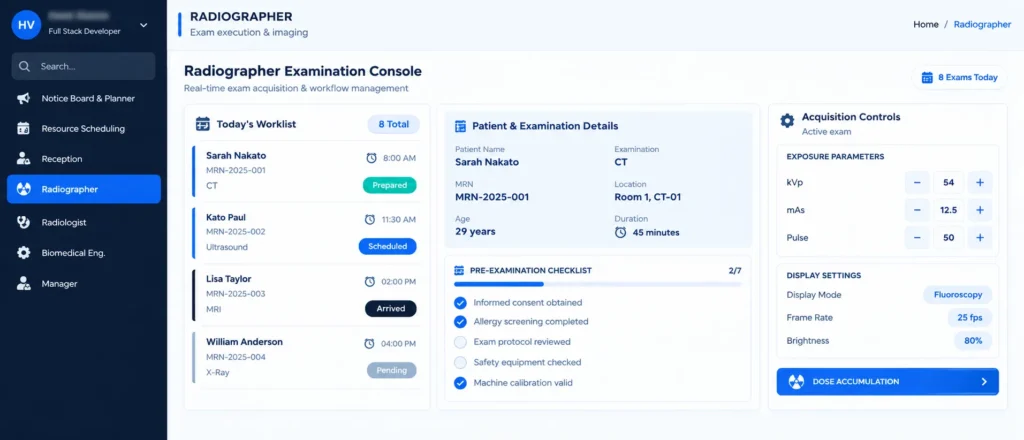
9. Radiology Management
Radiology runs as a complete workflow inside the hospital management information system, in four stages:
- Reception manages imaging requests, priorities, equipment status and emergency overrides.
- Delay monitoring flags requests that have gone past their scheduled time.
- The radiographer console manages worklists, pre-examination safety checklists and acquisition parameters such as kVp and mAs.
- The radiologist workstation combines an image viewer, structured reporting and a quality checklist. Finalized reports are added to the patient’s record.
10. Inventory and Stores Management
Hospital stores are fully digitized:
- Stock entry with batch numbers, expiry dates and shelving status
- Discrepancy management with local resolution and escalation
- A Facility Unit Catalogue with minimum and maximum stock levels
- A Stock Register showing opening, incoming, outgoing and closing balances
Trolley Management converts physical ward trolleys into e-trolleys. Each e-trolley tracks its own rows, stock, cleaning and discrepancies.
11. Dental Assessment and Mapping
An interactive odontogram supports both adult and primary dentition. For each tooth, dentists record:
- The diagnosis, coded to WHO ICD-11 (for example, DA08.0 – Dental caries)
- Clinical findings and affected surfaces
- Vitality, percussion, palpation and mobility
Every tooth keeps its own history. The history can be filtered by assessment, treatment, procedure or imaging.
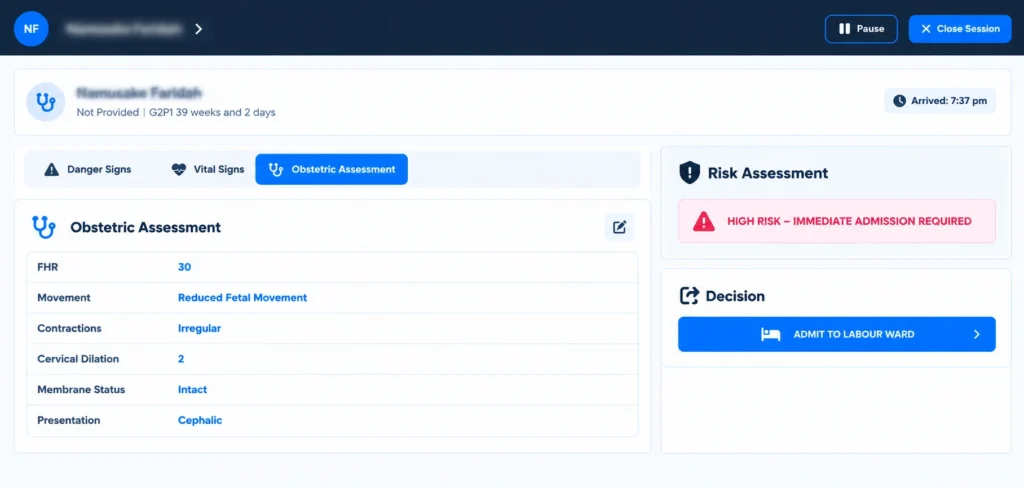
12. Maternity Triage
Maternity staff complete three structured steps:
- Danger Signs: such as vaginal bleeding, convulsions and reduced fetal movement.
- Vital Signs: with automatic flags such as “Suspected Elevated” blood pressure.
- Obstetric Assessment: fetal heart rate, contractions, cervical dilation, membrane status and presentation.
The system then calculates a risk level and recommends the next action. For example, it can show “High Risk – Immediate Admission Required” with a one-click Admit to Labour Ward button.
13. MediTrack: Medicine Batch Traceability
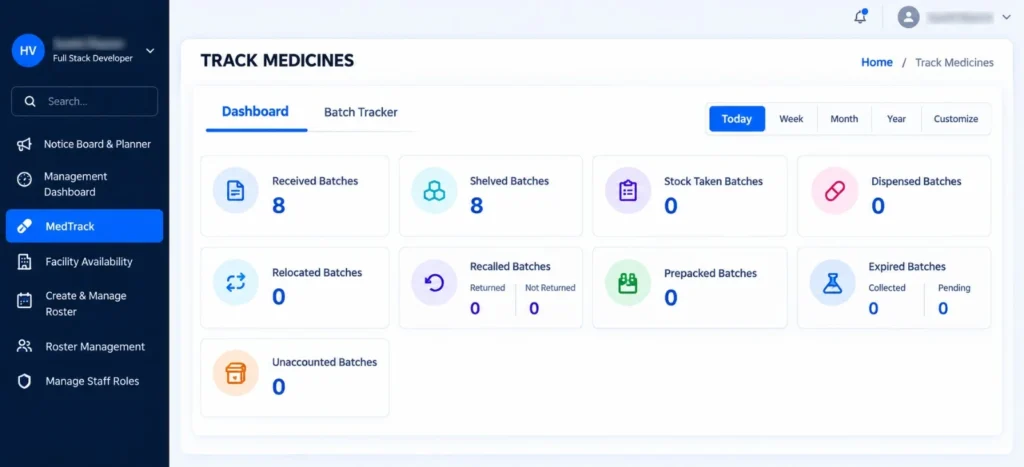
MediTrack follows every medicine batch through each stage of its lifecycle:
- Received
- Shelved
- Stock-taken
- Dispensed
- Relocated
- Recalled
- Prepacked
- Expired
- Unaccounted
The Batch Tracker searches by batch number, drug name or barcode. For each batch it shows the full activity history, including quantity, location, user and timestamp.
14. Employee Management and Employee Portal
HR teams manage staff from a central employee register that tracks complete and incomplete profiles. New employees are onboarded in four steps: Personal Information, Professional Information, Compensation & Benefits, and Documents.
The self-service Employee Portal lets staff:
- Check their leave balance and request leave
- View payslips
- Request salary advances or loans within their eligibility limits
15. Laboratory Module: From Order to Released Result
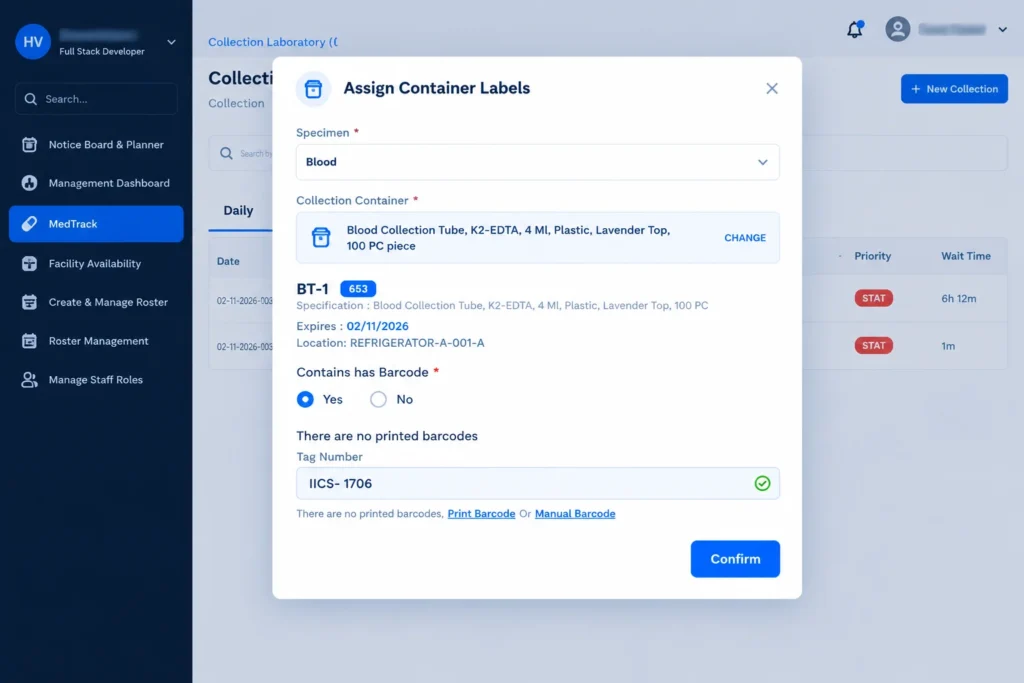
The laboratory workflow gives complete specimen traceability:
Investigation Order → Visit Routing → Specimen Collection → Container and Barcode Labeling → Lab Reception → Test Worklist → Result Entry → Verification → Approve and Release
Quality checks are built into every stage:
Verifiers confirm QC status before release, and must give a reason to return a result for correction.
Collectors confirm the patient’s identity before collecting a sample.
Reception staff check label legibility, container type, volume and haemolysis before accepting it.
16. Audit Trails and Consistent Queues Across Modules
Across the hospital management information system, key actions record who performed them and when. This covers everything from vitals entry to specimen collection and result approval.
Every department uses the same queue pattern: waiting, in service, paused, missed and carried forward. Staff learn it once and use it everywhere.
How IHMIS Connects the Complete Patient Journey
Here is how a single outpatient moves through the hospital management information system:
- Registration: the patient is registered or found at the front desk.
- Visit initiation: the patient is routed to General OPD → Triage with a priority set.
- Triage: vitals and emergency signs are recorded, and the patient is queued for consultation.
- Consultation: the clinician prescribes, orders tests and records a disposition.
- Diagnostics: lab and radiology results are processed, verified and released to the record.
- Admission (if needed): a bed is allocated, and nursing tasks and ward rounds begin.
- Follow-up: an appointment is booked and tracked.
Every step updates the same patient record, so no department works in isolation.
Key Design Principles
- Built around the patient journey. Modules follow the real flow of care, not department silos.
- Role-based by default. Each user sees only what their role requires.
- Safety checks at critical points. These include allergy and drug-interaction checks, triage emergency flags, maternity risk scoring and specimen quality checklists.
- Configurable for public hospitals. Wards, overflow rules, catalogues and trolleys are set up by the hospital, not hard-coded.
- End-to-end traceability. Medicine batches, lab specimens and patient locations are tracked from start to finish.
Results and Impact
With IHMIS, the client now has:
- One connected patient record across 28+ clinical and administrative units
- Real-time visibility into patient queues, bed occupancy and overdue nursing tasks
- Complete traceability for laboratory specimens and medicine batches
- Less paperwork across registration, clinical care, stores, HR and payroll
- Safer clinical decisions, supported by built-in checks and automated risk scoring
Why Choose Divergent for Hospital Management Information System Development?
Divergent Software Labs builds domain-specific enterprise software for healthcare, manufacturing and education. With IHMIS, we delivered a large-scale hospital management information system for a public healthcare network. It brings clinical, diagnostic, inventory and HR workflows together in one platform.
Explore our custom software development services or view more case studies.
What is IHMIS?
IHMIS (Integrated Health Management Information System) is a hospital management information system built by Divergent Software Labs for a government hospital network in Uganda. It connects registration, triage, consultation, laboratory, radiology, wards, inventory and HR in one platform.
What modules does a hospital management information system include?
A complete HMIS usually covers patient registration, visit management, triage, clinical consultation, prescriptions, laboratory, radiology, inpatient and bed management, appointments, inventory and HR. IHMIS delivers 16 integrated modules.
What is the difference between a hospital management system and a hospital management information system?
A hospital management system usually focuses on administration, such as billing, appointments and records. A hospital management information system connects clinical and administrative data from every department into one shared patient record.
Can a hospital management information system support multiple facilities?
Yes. IHMIS supports 28+ clinical and administrative units across multiple facilities, with facility-level configuration for wards, stores and service points.
How does IHMIS improve laboratory traceability?
Each specimen gets a unique label or barcode at collection. It then passes a quality check at reception and moves through result entry and verification, with an audit trail at every step.
Can Divergent build a custom hospital management information system for my hospital?
Yes. Contact Divergent Software Labs to discuss your hospital’s workflows and requirements.
Follow Divergent Softlab on Google
Enjoying our insights on manufacturing ERP, artificial intelligence and business technology? Add Divergent Softlab as a preferred source on Google to discover more of our latest articles.