ERP implementation in manufacturing is one of the highest-stakes projects a packaging or FIBC plant will undertake. Done well, it transforms how the factory operates, connecting departments, eliminating manual data entry, giving management real-time visibility and reducing the operational costs that have been quietly accumulating for years. Done poorly, it disrupts production, demoralizes the team and leaves the factory running two systems simultaneously for months while staff work around the new software rather than in it.
The difference between a successful ERP implementation in manufacturing and a failed one is rarely the software. Most modern manufacturing ERP systems are capable of delivering what packaging plants need. The difference is the implementation process how the project is planned, who owns it, how data is prepared, how training is run and how the cutover is managed.
According to Gartner, 55 to 75 percent of ERP implementations run over budget or over schedule, and a significant proportion fail to deliver the expected business outcomes. The plants that succeed follow a structured process. The plants that struggle improvise and pay the price in disruption, cost overruns and a system that the team never fully adopts.
This guide covers the 7-step ERP implementation checklist that packaging and FIBC manufacturers use to go live without disrupting production, the most common failure reasons and what to do at each stage to avoid them.
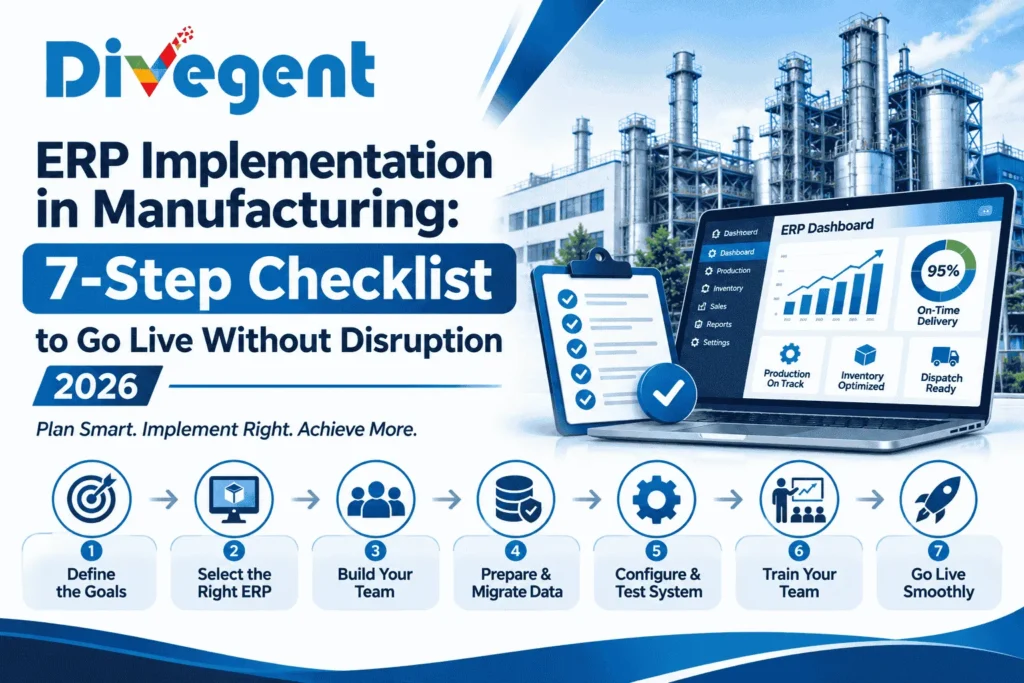
Table of Contents
- Why ERP Implementation in Manufacturing Fails
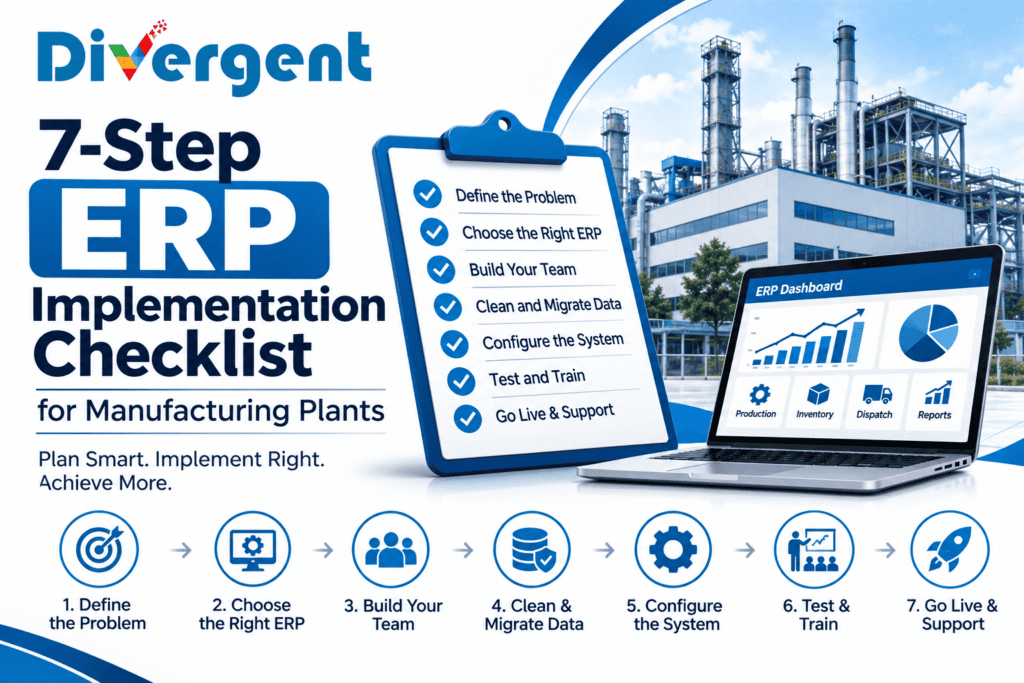
- The 7-Step ERP Implementation Checklist
- Step 1: Define the Problem Before Selecting Software
- Step 2: Select the Right ERP for Your Plant
- Step 3: Build the Right Implementation Team
- Step 4: Clean and Migrate Your Data
- Step 5: Configure, Test and Validate
- Step 6: Train Your Team
- Step 7: Go Live and Stabilise
- ERP Implementation Timeline for Packaging Plants
- What Does ERP Implementation Cost?
- 7 Most Common ERP Implementation Mistakes
- How Divergent PackPro Is Implemented
- Frequently Asked Questions
Why ERP Implementation in Manufacturing Fails
Understanding why ERP implementations fail in manufacturing plants is the most useful starting point — because the failure modes are predictable and avoidable when you know what to look for.
- Selecting software before defining the problem. Many plants choose an ERP based on a sales demonstration before they have clearly defined which operational problems they are trying to solve. The result is a system configured around what the vendor wanted to show rather than what the plant actually needs.
- No internal project owner. ERP implementation requires someone inside the plant who owns the project, not just a vendor project manager. When no internal person has accountability for the implementation, the project drifts, decisions are delayed and adoption never happens.
- Poor data quality going in. The most underestimated ERP implementation challenge in manufacturing is data. Item masters with missing fields, duplicate supplier records, stock quantities that do not match physical count and BOMs that have never been verified, all of these create problems the moment the system goes live.
- Insufficient training. Software training is not the same as process training. Staff who know how to click through screens but do not understand why they are doing each step will find workarounds rather than using the system correctly. Workarounds become habits. Habits become the new informal system running alongside the ERP.
- Big bang cutover. Switching the entire plant from the old system to the new one on a single day — with no parallel running period, is the highest-risk approach. One thing goes wrong, and the entire plant is affected. Most failed ERP implementations use this approach.
- No post-go-live support plan. The first 4 to 8 weeks after go-live are the highest-risk period. Staff are using the system for real, under production pressure, for the first time. Without dedicated support during this period, problems accumulate faster than they are resolved and the team loses confidence in the system.
The 7-Step ERP Implementation Checklist for Manufacturing Plants
This ERP implementation checklist covers every phase of a manufacturing ERP project, from problem definition to post-go-live stabilisation. Each step builds on the previous one. Skipping or rushing any step increases the risk of the steps that follow.
Step 1: Define the Problem Before Selecting Software
The first step in any successful ERP implementation in manufacturing is to define exactly what problems the ERP is being asked to solve — before looking at any software.
This sounds obvious, but most plants skip it. They invite vendors to demonstrate their software, get impressed by features they may never use and select a system based on the demonstration rather than their own documented requirements.
Before approaching any vendor, document the following:
- The top 5 operational problems the ERP must solve — late deliveries, excess inventory, quality escapes, manual reporting, disconnected departments
- The processes that must be covered — sales order, production planning, material purchasing, stores management, quality inspection, dispatch, accounts
- The integrations required — Tally for accounts, a weighbridge, a barcode scanner, a customer portal
- The non-negotiables — features or workflows without which the system cannot work in your plant
- The success metrics — how you will measure whether the ERP implementation has worked: on-time delivery rate, stockout frequency, report preparation time, inventory value
This document becomes the basis for vendor evaluation — you assess each vendor against your documented requirements, not against the features they chose to demonstrate.
Step 2: Select the Right ERP for Your Manufacturing Plant
ERP selection for manufacturing plants is not the same as ERP selection for a trading business or a service company. A packaging or FIBC plant needs an ERP that understands production — BOMs, routings, production orders, stage-wise tracking, wastage measurement, quality inspection at each stage. A generic accounting-led ERP can be configured to handle these, but the configuration effort is significant and the result is often fragile.
When evaluating ERP vendors for manufacturing ERP implementation, ask these questions:
- How many packaging or FIBC plant implementations has the vendor done? A vendor with 50 packaging plant references is different from one with 2. Ask for references from plants similar to yours in size and product type — and call them.
- Can the system handle your specific production process out of the box? Ask the vendor to demonstrate your actual process — extrusion, weaving, printing, stitching — not a generic manufacturing process. If it requires significant customisation to handle your workflow, that customisation will add cost, time and risk.
- What does a typical implementation take? Timeline, effort and cost. Compare this against what other vendors are quoting — significant outliers in either direction need explanation.
- What is included in the implementation fee? Data migration, training, configuration, go-live support and post-go-live hypercare should all be explicitly included or explicitly excluded — with a price for anything excluded.
- What happens after go-live? Annual support, system updates, additional training and customisation requests — how are these handled and at what cost?
Step 3: Build the Right ERP Implementation Team
ERP implementation in manufacturing is not a vendor-only project. The vendor brings the software and the implementation methodology. The plant brings the process knowledge, the data, the decisions and the adoption. Without genuine plant-side ownership and engagement, the implementation will fail regardless of how capable the vendor is.
The minimum internal team for a manufacturing ERP implementation is:
- Project owner (1 person): A senior manager — ideally the plant head or operations director — who has decision-making authority and is personally accountable for the implementation outcome. This person attends key reviews, resolves decisions that cannot be delegated and communicates the project’s importance to the wider team.
- Module leads (1 per department): One person from each affected department, production, stores, quality, dispatch, accounts, who understands their department’s process in detail, participates in configuration and testing, and owns training within their department.
- Data owner (1 person): Someone responsible for preparing, cleaning and migrating the master data — item master, BOM, customer and supplier records, opening stock — that the system needs to go live.
The most common reason ERP implementations in manufacturing fail is that the internal team is not given enough time to participate in the project. If module leads are expected to contribute to the ERP while simultaneously managing their full departmental workload, the ERP project will always lose. Plan for implementation participation to take 20 to 30 percent of each module lead’s time during the implementation period.
Step 4: Clean and Migrate Your Data
Data preparation is the most underestimated step in ERP implementation in manufacturing — and the one most likely to cause a failed go-live. The ERP system is only as good as the data in it. If the item master is incomplete, duplicate or inconsistently named, every transaction that depends on it will have problems. If opening stock quantities do not match the physical count, the system will give wrong inventory information from day one.
The data that must be prepared for a manufacturing ERP implementation includes:
- Item master: Every raw material, packing material, semi-finished and finished item with a unique code, consistent name, unit of measure, HSN code and product category. This is typically the largest and most time-consuming data preparation task and the most important.
- Bill of materials (BOM): The material inputs required to produce each finished product, in the correct quantities and units of measure. In packaging plants, BOMs are often not formally documented — they exist in the production manager’s head or in informal Excel files. The ERP implementation is the opportunity to document and standardise them.
- Customer and supplier master: All active customers and suppliers with correct names, addresses, GST numbers, payment terms and contact details.
- Opening stock: Physical stock count of all raw materials, semi-finished goods and finished goods at the date of go-live. This count must be conducted and verified immediately before go-live — not weeks earlier.
- Open orders: All customer orders and purchase orders that are open at go-live — orders that were placed before the system started but have not yet been fulfilled.
Allow 4 to 8 weeks for data preparation — more if the plant has never had a formal item master. The vendor can provide templates, but the data must come from the plant. No vendor can clean data they do not understand.
Step 5: Configure, Test and Validate
System configuration is where the ERP is set up to reflect the plant’s specific processes — approval workflows, tax settings, warehouse locations, production stages, quality parameters and reporting formats. In a packaging plant, this includes configuring the specific stages of production — extrusion, weaving, printing, cutting, stitching — and the quality checks at each stage.
After configuration, the system must be tested — not by the vendor, but by the plant’s module leads using real transactions from the plant’s own operations. User acceptance testing (UAT) should cover:
- End-to-end process flows: A complete cycle from sales order to dispatch — including production, material consumption, quality inspection and dispatch — run through the system with real data from the plant.
- Exception scenarios: What happens when a production order is partially completed? When a batch fails quality? When a partial delivery is made? When a purchase order is received short? These scenarios must be tested before go-live — not discovered after.
- Reports and dashboards: Every report that management, production and accounts will use after go-live — production daily report, stock position, pending order report, quality rejection summary — must be verified to show the correct data in the correct format.
Any issues found during UAT must be resolved before go-live — not noted as post-go-live items. Go-live is not the time to discover that the production stage sequence is wrong or that a critical report is missing.
Step 6: Train Your Team for ERP Implementation
Training for ERP implementation in manufacturing must cover two things: how to use the software and why each process works the way it does in the new system. Staff who only learn the mechanics — click this, enter that — will struggle the moment they encounter a scenario that was not covered in training. Staff who understand the logic of the process adapt to new scenarios because they understand what the system is trying to achieve.
Training principles that work in manufacturing ERP implementations:
- Train role by role, not department by department. A storekeeper’s training should cover exactly what a storekeeper does — goods receipt, material issue, stock transfer — not everything the stores department does. Focused training on the actual role is absorbed better than broad training on the full module.
- Train on real data from the plant. Training conducted on dummy data from the vendor’s demo system does not prepare staff for the plant’s actual products, customers and production processes. Train on a copy of the real system with the plant’s own data.
- Train close to go-live. Training conducted 6 weeks before go-live will be largely forgotten by the time staff use the system for real. Train 1 to 2 weeks before go-live — close enough that the learning is fresh when it is needed.
- Document quick reference guides. A one-page step-by-step guide for each common transaction — how to raise a goods receipt, how to issue material to production, how to record a quality inspection — gives staff something to refer to when they get stuck, without needing to call the vendor.
Step 7: Go Live and Stabilise
The go-live approach for ERP implementation in manufacturing determines how much disruption the plant experiences during the transition. There are three main approaches:
| Approach | How It Works | Risk Level | Best For |
|---|---|---|---|
| Big bang | All modules go live on a single date across the entire plant | 🔴 High | Small plants with simple processes and strong implementation readiness |
| Phased rollout | Modules go live in sequence — stores and purchase first, then production, then quality, then dispatch | 🟡 Medium | Mid-size plants where all modules are interdependent |
| Parallel running | Old system and new system run simultaneously for 4 to 8 weeks | 🟢 Low | Plants where go-live risk cannot be absorbed — first-time ERP implementations |
For most packaging and FIBC plants implementing ERP for the first time, a phased rollout with a 4-week parallel running period is the recommended approach. It allows the team to use the new system while the old system is still available as a fallback — reducing the cost of errors during the learning period.
The stabilisation period — the 4 to 8 weeks after go-live — is when the most critical support is needed. Daily check-ins between the plant team and the vendor implementation team, rapid resolution of issues that affect production, and visible management support for the system are all essential during this period. The plants that stabilise quickly after go-live are those where senior management is actively using the system and visibly supporting the team in using it.
ERP Implementation Timeline for Packaging Plants
A realistic ERP implementation timeline for a mid-size packaging or FIBC plant depends on plant complexity, data readiness and implementation team availability. Typical timelines:
| Plant Type | Modules | Typical Timeline |
|---|---|---|
| Small plant, single product, simple process | Stores, production, dispatch, basic accounts | 8–12 weeks |
| Mid-size plant, multiple products | Full suite — sales, production, quality, stores, purchase, dispatch, accounts | 14–20 weeks |
| Large plant, multiple lines and locations | Full suite with multi-warehouse and multi-plant | 24–36 weeks |
These timelines assume that the internal implementation team is available and engaged, that data preparation starts at project kick-off rather than halfway through and that decisions are made promptly when the vendor needs sign-off. Delays in any of these three areas extend the timeline proportionally.
What Does ERP Implementation Cost in Manufacturing?
ERP implementation cost in manufacturing has two components: software cost and implementation cost. Both vary significantly based on plant size, number of users, modules required and vendor.
| Cost Component | Small Plant | Mid-Size Plant | Large Plant |
|---|---|---|---|
| Software licence (annual) | ₹2–5 lakhs | ₹5–15 lakhs | ₹15–40 lakhs |
| Implementation fee (one-time) | ₹2–6 lakhs | ₹6–20 lakhs | ₹20–60 lakhs |
| Data migration | ₹0.5–1.5 lakhs | ₹1–4 lakhs | ₹4–10 lakhs |
| Training | ₹0.5–1 lakh | ₹1–3 lakhs | ₹3–8 lakhs |
| Total Year 1 cost | ₹5–14 lakhs | ₹13–42 lakhs | ₹42–118 lakhs |
The ROI on a successful ERP implementation in manufacturing typically comes from four sources: reduced inventory value, lower emergency procurement costs, reduced rework and customer return costs, and management time saved on manual reporting. For most mid-size packaging plants, these savings combined exceed the Year 1 ERP cost within 18 to 24 months of go-live.
7 Most Common ERP Implementation Mistakes in Manufacturing
These are the seven mistakes that most frequently cause ERP implementations in manufacturing plants to fail, run over budget or deliver less than expected.
- Treating ERP implementation as a technology project. ERP implementation is a business change project that happens to involve technology. The primary challenge is not software installation — it is changing how people work. Plants that treat it as an IT project underinvest in change management and training.
- Selecting a generic ERP for a specialist manufacturing process. A packaging plant needs an ERP that understands GSM-based costing, stage-wise production tracking and roll-wise inventory. A generic ERP that can be configured to handle these takes significantly longer to implement and is harder to support.
- Starting data preparation too late. Data preparation should start on day one of the project. Most plants start it in the final 4 weeks — and discover that the item master has 400 duplicate records, 200 items with missing units of measure and BOMs that have never been formally documented.
- No internal project owner. When the vendor is the only person driving the project, progress depends on vendor availability. Every decision that requires a plant-side input takes days rather than hours because no one inside the plant has authority or accountability to make it.
- Configuring the system around current bad processes. ERP implementation is an opportunity to fix broken processes — not just digitise them. A plant that implements an ERP around a process that was already causing problems will have those problems in the ERP. Every configuration decision is an opportunity to ask: should this process work differently?
- Skipping UAT. User acceptance testing is the safety net between configuration and go-live. Plants that skip it to save time consistently discover critical problems in the first week of live operation — at the worst possible moment.
- No hypercare period after go-live. The first 4 weeks after go-live require more vendor support, not less. Plants that do not budget for or insist on hypercare support find that the implementation team disengages at go-live and the plant team is left to resolve problems alone — while trying to keep production running.
How Divergent PackPro Is Implemented
Divergent PackPro is a manufacturing ERP built specifically for FIBC, BOPP, PP woven bag and packaging plants. Its implementation methodology is designed around the specific challenges of packaging plant ERP implementation — data complexity, multi-stage production, shift-based operations and the need to go live without disrupting ongoing production.
- Industry-specific configuration: PackPro is pre-configured for packaging plant processes — extrusion, weaving, printing, cutting, stitching and lamination — so implementation time is spent on plant-specific setup rather than building generic manufacturing functionality from scratch.
- Structured data migration: Divergent provides templates and guidance for item master, BOM, customer and supplier data migration — with validation checks that catch common data quality problems before they reach the live system.
- Role-based training: Training is delivered by role — storekeeper, production supervisor, quality inspector, dispatch executive, accounts — using the plant’s own products, customers and production processes.
- Phased go-live support: Divergent’s standard implementation includes a 4-week hypercare period after go-live — dedicated support to resolve issues quickly before they affect production or customer commitments.
- Tally integration: For plants that want to keep Tally for statutory accounts, PackPro includes a standard Tally integration — financial entries from PackPro flow into Tally automatically, so the accounts team continues working in the software they know.
See how Divergent PackPro works or speak to our team about your implementation requirements. We will walk you through the timeline, data requirements and what the implementation process looks like for a plant of your size and type.
Frequently Asked Questions — ERP Implementation in Manufacturing
How long does ERP implementation take in manufacturing?
ERP implementation in manufacturing typically takes 8 to 12 weeks for a small plant with simple processes, 14 to 20 weeks for a mid-size plant with full module coverage, and 24 to 36 weeks for a large multi-line or multi-location plant. These timelines assume that the internal team is engaged, data preparation starts at project kick-off and decisions are made promptly.
What is the biggest risk in ERP implementation?
The biggest risk in ERP implementation in manufacturing is poor data quality. An item master with duplicates, missing fields or inconsistent naming causes problems in every transaction that depends on it from day one. Data preparation should start on day one of the project — not in the final weeks before go-live.
How much does ERP implementation cost in manufacturing?
ERP implementation cost in manufacturing ranges from ₹5 to ₹14 lakhs for a small plant in Year 1, ₹13 to ₹42 lakhs for a mid-size plant and ₹42 to ₹118 lakhs for a large plant. Cost includes software licence, implementation fee, data migration and training. Most plants recover the Year 1 cost within 18 to 24 months through reduced inventory, lower procurement costs and time saved on manual reporting.
What is the best approach to ERP go-live in manufacturing?
For most packaging and FIBC plants implementing ERP for the first time, a phased rollout with a 4-week parallel running period is the lowest-risk approach. All modules do not go live simultaneously — stores and purchase first, then production, then quality and dispatch — and the old system remains available as a fallback during parallel running.
Do I need to replace Tally when implementing a manufacturing ERP?
No. Most packaging plants keep Tally for statutory accounts and add a manufacturing ERP for production, stores, quality and dispatch. A standard integration between the manufacturing ERP and Tally passes financial entries automatically — so the accounts team continues working in Tally while every other department uses the ERP.
What data do I need to prepare for ERP implementation?
The essential data for manufacturing ERP implementation is: item master (all raw materials, semi-finished and finished items), bills of material, customer and supplier master, and opening stock (physical count at go-live date). Open sales orders and purchase orders at go-live must also be entered. Data preparation typically takes 4 to 8 weeks and should start on day one of the project.
How do I choose between ERP vendors for my packaging plant?
Evaluate ERP vendors for your packaging plant against your documented requirements — not against the features they choose to demonstrate. Ask for references from packaging or FIBC plants of similar size, ask the vendor to demonstrate your specific production process (not a generic one), and ask explicitly what is included in the implementation fee versus what costs extra.
What is a manufacturing ERP implementation checklist?
A manufacturing ERP implementation checklist covers: define the problem, select the right ERP, build the implementation team, clean and migrate data, configure and test, train by role and go live with a phased approach. Each step builds on the previous one — skipping or rushing any step increases the risk of failure in the steps that follow.
Why do ERP implementations fail in manufacturing?
ERP implementations in manufacturing fail most commonly because of poor data quality going in, no internal project owner, insufficient training, a big bang go-live approach with no fallback and inadequate support in the first weeks after go-live. The failure is almost never because the software is wrong — it is because the implementation process was wrong.
What is hypercare in ERP implementation?
Hypercare is the dedicated post-go-live support period — typically 4 to 8 weeks — when the vendor provides intensive support to resolve issues quickly as the plant team uses the system for real operations for the first time. Hypercare is the most important and most frequently skipped component of ERP implementation in manufacturing. Plants without hypercare support take significantly longer to stabilise after go-live.
Related Reading
- 12 Critical Manufacturing Challenges and How ERP Solves Them
- Disconnected Departments in Manufacturing: How Silos Cost You Money
- Tally vs ERP for Textile Manufacturing: When Tally Stops Being Enough
- FIBC ERP Software: How to Choose the Best System
- PP Woven Bag ERP Software: 9 Must-Have Features
Follow Divergent Softlab on Google
Enjoying our insights on manufacturing ERP, artificial intelligence and business technology? Add Divergent Softlab as a preferred source on Google to discover more of our latest articles.