Is ERP better than Excel for manufacturing?
ERP vs Excel in manufacturing is not a close comparison. ERP connects every department — production, stores, quality, dispatch and accounts — in one live system, while Excel keeps each department working from separate files that are always out of date. The ERP vs Excel difference is not about features. It is about whether the person making a decision right now is working from accurate information or from a spreadsheet that was last updated three hours ago. Every packaging plant running on Excel is paying the cost of that gap every single day.
Most packaging and FIBC plants already feel the ERP vs Excel problem every day. They have felt the production stoppage caused by a stock figure that was wrong in the spreadsheet. They have experienced the late delivery caused by a sales commitment made without checking the production schedule. They know Excel is not enough. What stops them from switching is the belief that ERP vs Excel is a complicated, expensive choice. This guide addresses each of those concerns — with numbers that show exactly what Excel is costing and what switching to ERP delivers.
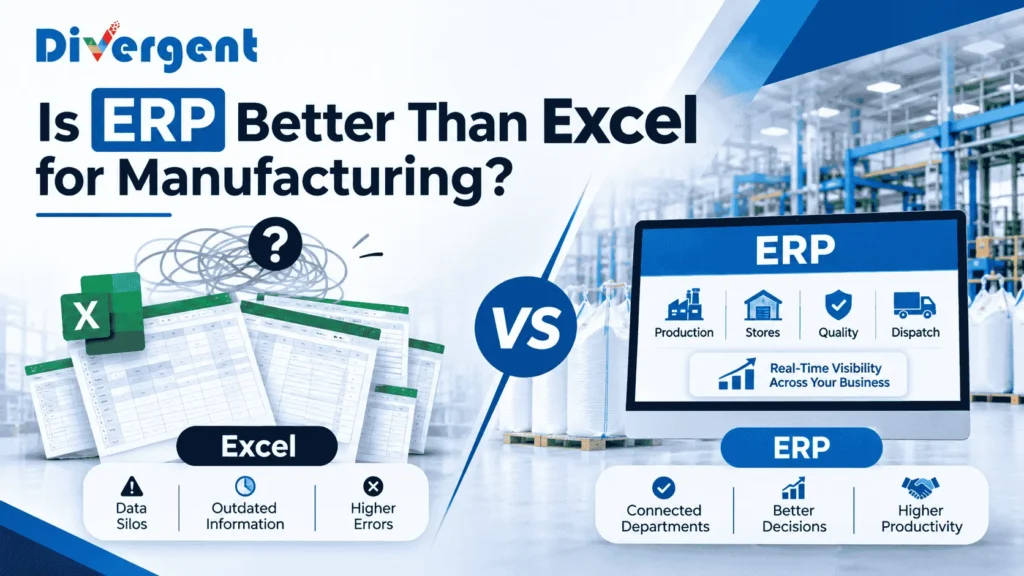
Table of Contents
- ERP vs Excel: What Is the Actual Difference?
- What Excel Cannot Do in Manufacturing
- The Real Cost of Running a Factory on Excel
- ERP vs Excel: Feature-by-Feature Comparison
- When Should a Packaging Plant Switch From Excel to ERP?
- What Does Switching From Excel to ERP Cost?
- ERP ROI: What Packaging Plants Get Back
- Common Fears About Switching to ERP — Addressed
- Divergent PackPro: ERP Built for Packaging Plants
- Frequently Asked Questions
ERP vs Excel: What Is the Actual Difference?
What is the difference between ERP and Excel for manufacturing?
The difference between ERP vs Excel in manufacturing is that ERP is a shared, live system where every transaction updates a single record visible to all departments simultaneously, while Excel is a collection of separate files that each department maintains independently and that are never fully synchronised. ERP vs Excel comes down to this: ERP connects people, Excel separates them.
When a storekeeper issues material in an ERP system, the production team sees the updated stock balance immediately. The purchase team’s reorder alert fires automatically. The management dashboard reflects the change. All of this happens the moment the transaction is recorded — without anyone sending a message, forwarding a file or making a phone call.
When a storekeeper issues material in Excel, they update their spreadsheet. That update exists only in their file. The production team still sees the old balance. The purchase team has no alert. The management team will see the change when someone manually compiles the weekly report — if the storekeeper’s update was remembered and correctly entered. This gap between what happened and what the system shows is where most manufacturing operational problems begin.
What Excel Cannot Do in Manufacturing
What are the limitations of Excel in manufacturing?
The limitations of Excel in manufacturing are that it cannot update in real time across multiple users, cannot enforce process controls, cannot link transactions across departments automatically, cannot calculate material requirements from a production plan, and cannot prevent errors from manual data entry. Excel is a tool for analysing data that already exists — not for managing operations as they happen.
- No real-time visibility: Every Excel file is a snapshot of the moment it was last saved. In a packaging plant where dozens of transactions happen every hour, the snapshot is always out of date. A production manager checking stock in Excel at 10am is seeing stock as it was when someone last updated the file — which may have been yesterday evening.
- No process enforcement: Excel cannot stop a storekeeper from issuing material that is under quality hold. It cannot prevent dispatch from shipping a batch that failed inspection. It cannot block a purchase order from being raised for material already in stock under a different item code. ERP enforces these controls automatically — Excel relies entirely on human vigilance, which fails under production pressure.
- No multi-user live update: When two people edit the same Excel file simultaneously, the second save overwrites the first. Factories work around this by keeping separate files per person or per department — which creates the data silo problem that every packaging plant manager recognises.
- No automatic material requirements: To know what to purchase for next week’s production in Excel, someone must manually check each material in the BOM against the current stock level and calculate the shortfall. In an ERP, this calculation runs automatically from the production plan — the purchase team sees exactly what to order, in what quantity, by what date.
- No audit trail: Excel does not record who changed what, when. When a stock figure is wrong, there is no way to trace how it happened. ERP logs every transaction with the user, the timestamp and the values before and after the change.
- No scalability: A factory with 10 people and 20 materials can run on Excel. A factory with 100 people, 500 materials, 50 active customer orders and three production shifts cannot — not because Excel lacks features, but because the volume of manual updates required exceeds what any team can reliably maintain.
The Real Cost of Running a Factory on Excel
How much does using Excel instead of ERP cost a manufacturing plant?
Running a packaging factory on Excel instead of ERP typically costs between Rs 25 lakhs and Rs 90 lakhs per year in avoidable losses — from excess inventory, emergency procurement, production stoppages, quality escapes and management time spent on manual reporting. The ERP vs Excel cost comparison is never shown on a single line of the P&L, which is exactly why Excel persists long after it should have been replaced.
| Excel Problem | What It Costs | Annual Estimate |
|---|---|---|
| Excess inventory from poor visibility | Working capital locked up, storage cost | Rs 15-40 lakhs |
| Emergency procurement from stockouts | Premium price, expedited freight | Rs 5-15 lakhs |
| Production stoppages from wrong stock data | Idle machines, idle labour | Rs 4-12 lakhs |
| Quality escapes from no process control | Customer returns, rework, freight | Rs 3-10 lakhs |
| Late deliveries from poor planning | Customer penalties, lost repeat orders | Rs 2-8 lakhs |
| Management time on manual MIS | Senior team hours on data compilation | Rs 2-5 lakhs |
| Total annual cost of Excel | Rs 31-90 lakhs |
According to McKinsey, manufacturers that move from manual systems to connected ERP reduce operational costs by 15 to 20 percent within the first two years. For a plant with Rs 10 crore annual revenue, that is Rs 15 to Rs 20 lakhs saved per year — from a system that typically costs Rs 5 to Rs 15 lakhs in Year 1.
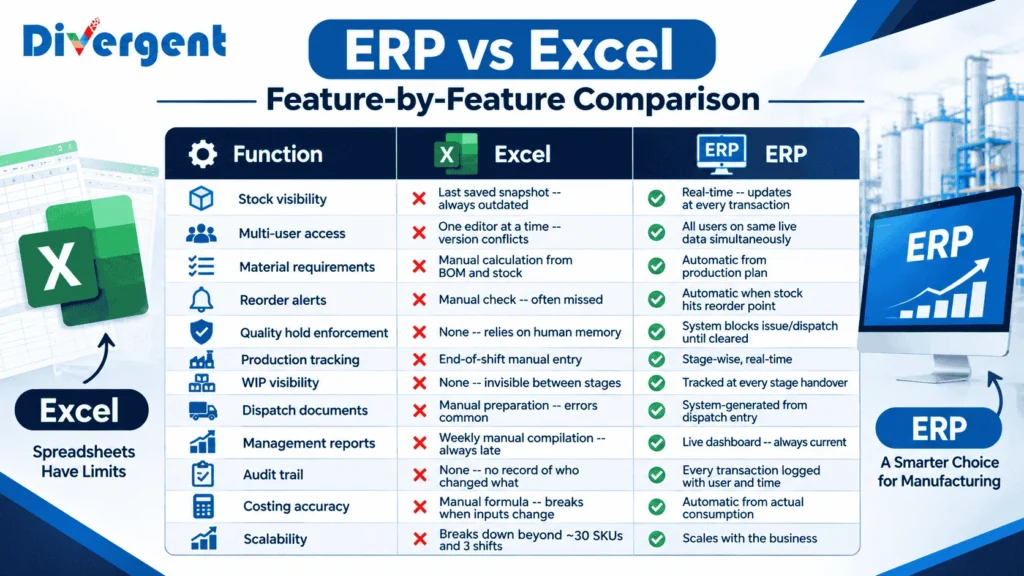
ERP vs Excel: Feature-by-Feature Comparison
| Function | Excel | ERP |
|---|---|---|
| Stock visibility | Last saved snapshot — always outdated | Real-time — updates at every transaction |
| Multi-user access | One editor at a time — version conflicts | All users on same live data simultaneously |
| Material requirements | Manual calculation from BOM and stock | Automatic from production plan |
| Reorder alerts | Manual check — often missed | Automatic when stock hits reorder point |
| Quality hold enforcement | None — relies on human memory | System blocks issue/dispatch until cleared |
| Production tracking | End-of-shift manual entry | Stage-wise, real-time |
| WIP visibility | None — invisible between stages | Tracked at every stage handover |
| Dispatch documents | Manual preparation — errors common | System-generated from dispatch entry |
| Management reports | Weekly manual compilation — always late | Live dashboard — always current |
| Audit trail | None — no record of who changed what | Every transaction logged with user and time |
| Costing accuracy | Manual formula — breaks when inputs change | Automatic from actual consumption |
| Scalability | Breaks down beyond ~30 SKUs and 3 shifts | Scales with the business |
When Should a Packaging Plant Switch From Excel to ERP?
When is the right time to move from Excel to ERP in manufacturing?
The right time to move from Excel to ERP in manufacturing is when the cost of Excel problems exceeds the cost of ERP implementation. For most packaging plants, this point arrives when the plant has more than three production lines, more than 50 active SKUs, more than two shifts, or more than 20 people involved in operations.
The seven signs your factory has outgrown Excel:
- Stock counts never match Excel records at month end
- Production stops because material ran out without warning
- Sales commits delivery dates without checking production capacity
- Management MIS takes more than one day to compile
- Quality problems reach customers because inspection records did not reach dispatch
- Purchase raises orders for material already in stock under a different code
- No one can tell you, right now, how many confirmed orders are outstanding and what their status is
If three or more of these apply, the factory has already outgrown Excel. See our guide to ERP implementation in manufacturing for the 7-step checklist.
What Does Switching From Excel to ERP Cost?
How much does it cost to switch from Excel to ERP in manufacturing?
Switching from Excel to ERP in manufacturing costs between Rs 5 and Rs 42 lakhs in Year 1 for a mid-size packaging plant, covering software licence, implementation, data migration and training. Most plants recover this investment within 12 to 18 months through reduced inventory, lower procurement costs and eliminated manual reporting time.
| Plant Size | Year 1 ERP Cost | Annual Excel Cost (saved) | Payback Period |
|---|---|---|---|
| Small (10-30 looms) | Rs 5-14 lakhs | Rs 25-40 lakhs | 4-7 months |
| Mid-size (30-100 looms) | Rs 13-30 lakhs | Rs 40-70 lakhs | 5-9 months |
| Large (100+ looms) | Rs 30-60 lakhs | Rs 60-90 lakhs | 8-12 months |
ERP ROI: What Packaging Plants Get Back
What is the ROI of ERP for a packaging manufacturer?
The ERP vs Excel ROI calculation for packaging manufacturers favours ERP decisively. ERP delivers reduced inventory value as purchasing becomes demand-driven, lower emergency procurement costs as stockouts are predicted before they occur, reduced quality escapes as process controls are enforced automatically, and management time saved as reports become live dashboards. Together these typically deliver 15 to 25 percent reduction in operational costs within the first two years — far exceeding the cost of the ERP system itself.
- Inventory reduction: When purchasing is driven by real-time consumption and confirmed orders, most plants reduce inventory value by 20 to 30 percent within the first year. For a plant carrying Rs 1 crore of raw material inventory, that is Rs 20 to Rs 30 lakhs freed from working capital.
- Emergency procurement eliminated: Automatic reorder alerts give the purchase team 2 to 4 weeks of lead time before a stockout occurs. Emergency procurement at premium price drops to near zero within the first few months of ERP operation.
- On-time delivery improves: When production planning is based on real capacity and confirmed orders, most plants see on-time delivery improve by 20 to 35 percent within six months — reducing customer penalties and improving repeat order rates.
- Management reporting time eliminated: The weekly MIS that takes a team two days to compile becomes a live dashboard that is always current. Senior management time redirected to decisions that require human judgment.
Common Fears About Switching From Excel to ERP — Addressed
What stops manufacturers from switching from Excel to ERP?
The most common fears about the ERP vs Excel decision in manufacturing are that ERP will be too expensive, too complicated, too disruptive and that the team will not adopt it. Each of these ERP vs Excel concerns is legitimate — and each is addressable with the right choice of system and implementation approach.
ERP is too expensive for our size
Purpose-built ERP for packaging plants starts at Rs 2 to Rs 5 lakhs per year for smaller plants. Compare this to the Rs 25 to Rs 40 lakhs per year that most plants of that size are losing to Excel problems. The question is not whether the plant can afford ERP — it is whether the plant can afford to continue without it.
Our team will not learn a new system
The key is role-based training — the storekeeper learns only what a storekeeper does, the production supervisor learns only what a production supervisor does. No one learns the entire system. With role-specific training conducted one to two weeks before go-live, adoption is typically solid within two to four weeks. See our guide on workforce challenges in manufacturing for how training affects adoption.
Implementation will disrupt production
A phased rollout with a parallel running period — where the old system and the new system run simultaneously for four to eight weeks — eliminates most go-live risk. Production continues on the old system while the team builds confidence in the new one. See our complete guide to ERP implementation without production disruption.
We will lose the flexibility of Excel
The flexibility of Excel — the ability to put any number anywhere — is also its biggest weakness. It is the same flexibility that allows a wrong figure to propagate through twelve linked cells and corrupt every downstream calculation. ERP trades that flexibility for accuracy and reliability.
Divergent PackPro: ERP Built for Packaging Plants Moving From Excel
Divergent PackPro is a manufacturing ERP built specifically for FIBC, BOPP, PP woven bag and packaging plants — designed to solve the exact problems that Excel cannot handle in packaging production.
- Real-time stock visibility: Every goods receipt, material issue and production entry updates the stock balance instantly — visible to stores, production, purchase and management simultaneously.
- Automatic reorder alerts: Materials falling below their reorder point trigger an alert to the purchase team automatically — calculated from actual consumption and actual supplier lead time.
- Production-linked purchasing: Material requirements calculated directly from the production plan and BOM. When the plan changes, the purchase recommendation updates. No manual recalculation required.
- Quality enforcement: Batches under quality hold cannot be issued to production or dispatched to customers. The system enforces this automatically — without requiring anyone to remember.
- Live management dashboard: Production output, stock levels, quality pass rates, pending orders and dispatch status — all on one screen, updated as transactions happen.
- Tally integration: Financial entries from PackPro flow into Tally automatically. Accounts stays in Tally. Operations runs in PackPro. Both systems stay synchronised.
See how Divergent PackPro works or speak to our team for a demonstration using your own products and production process.
Frequently Asked Questions — ERP vs Excel in Manufacturing
Is ERP better than Excel for manufacturing?
Yes. ERP is significantly better than Excel for manufacturing because it connects every department in one live system while Excel keeps departments working from separate files that are always out of date. ERP enforces process controls that Excel cannot — quality holds, reorder alerts, automatic material requirements — and provides real-time visibility that Excel cannot match.
What are the limitations of Excel in manufacturing?
The limitations of Excel in manufacturing are that it cannot update in real time across multiple users, cannot enforce process controls, cannot link transactions across departments automatically, cannot calculate material requirements from a production plan, provides no audit trail and breaks down at scale beyond about 50 SKUs and three shifts.
How much does running a factory on Excel cost?
Running a packaging factory on Excel instead of ERP typically costs between Rs 25 lakhs and Rs 90 lakhs per year in avoidable losses — from excess inventory, emergency procurement, production stoppages, quality escapes and management time on manual reporting.
When should a manufacturing plant switch from Excel to ERP?
The right time to switch is when the plant has more than three production lines, more than 50 active SKUs, more than two shifts, or when any three of the following apply: stock counts never match Excel, production stops from unexpected shortages, sales commits without checking capacity, MIS takes more than a day to compile, quality problems reach customers.
How much does it cost to switch from Excel to ERP?
Switching from Excel to ERP costs between Rs 5 and Rs 14 lakhs Year 1 for a small packaging plant and Rs 13 to Rs 30 lakhs for a mid-size plant. Most plants recover this within 12 to 18 months through reduced inventory, lower procurement costs and eliminated reporting time.
Will ERP disrupt production during implementation?
A phased rollout with parallel running — where the old system and new system run simultaneously for four to eight weeks — eliminates most go-live risk. Production continues on the old system while the team builds confidence in the new one.
Can a packaging plant keep using Tally with ERP?
Yes. Most packaging plants keep Tally for statutory accounts and add a manufacturing ERP for production, stores, quality and dispatch. A standard integration passes financial entries automatically — accounts continues in Tally while every operational function runs in the ERP.
What is the ROI of ERP for manufacturing?
ERP ROI comes from four sources: 20-30% inventory reduction, eliminated emergency procurement, 20-35% better on-time delivery and management reporting time saved. Together these deliver 15 to 25 percent reduction in operational costs within two years.
Why do manufacturers keep using Excel instead of ERP?
Because Excel problems are individually invisible. No single stockout, emergency purchase or late delivery gets attributed to Excel. The cost accumulates silently across hundreds of small failures, never appearing as a single line item that demands action.
What does ERP do that Excel cannot do in manufacturing?
ERP does five things Excel cannot: connects all departments to the same live data, enforces process controls automatically, calculates material requirements from the production plan, generates management reports in real time and maintains a complete audit trail of every transaction.
Related Reading
- ERP Implementation in Manufacturing: 7-Step Checklist
- Inventory Management Challenges: 9 Costly Problems
- Disconnected Departments in Manufacturing
- Tally vs ERP: When Tally Stops Being Enough
- 12 Critical Manufacturing Challenges and How ERP Solves Them
Follow Divergent Softlab on Google
Enjoying our insights on manufacturing ERP, artificial intelligence and business technology? Add Divergent Softlab as a preferred source on Google to discover more of our latest articles.